Any model, your keys
Claude, GPT, Gemini, any OpenAI-compatible endpoint, and local models via Ollama or LM Studio. The picker shows each model's context window and capability badges, read live from the host.
Point Houston at Claude, GPT, Gemini, any OpenAI-compatible API, or a local model. Give it a project folder and let it read, edit, search, and run code. Every action is gated by an approval flow.
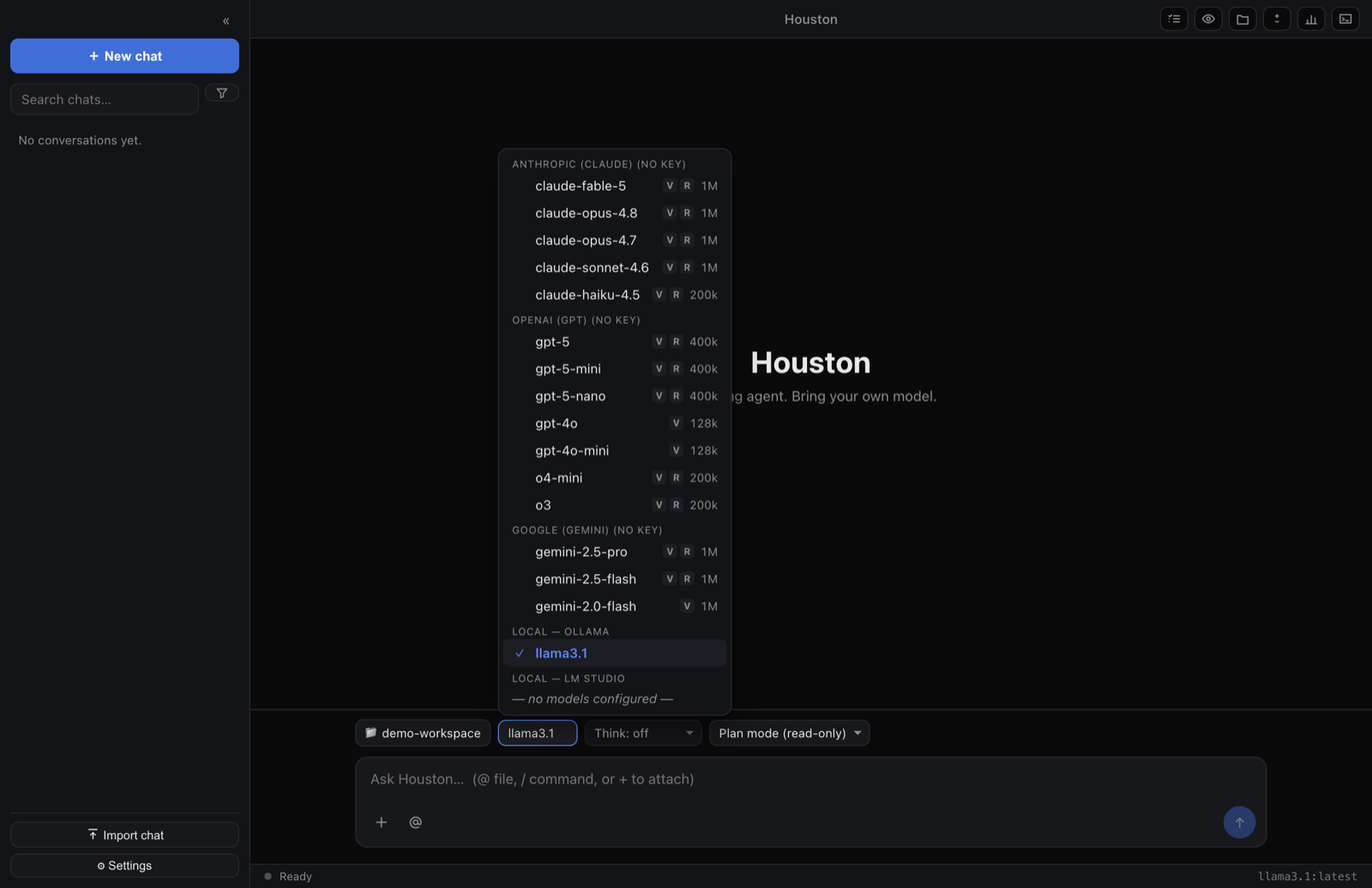
Not just chat: Houston reads, edits, searches, and runs your code, with you in the loop on every consequential step.
Claude, GPT, Gemini, any OpenAI-compatible endpoint, and local models via Ollama or LM Studio. The picker shows each model's context window and capability badges, read live from the host.
Read, write, edit, patch, search, run shell, inspect git, fetch and search the web, and drive pull requests. Pure reads run concurrently; anything that writes or runs stays sequential.
Choose plan, ask, auto, or full-auto. Every consequential action is reviewable, and where the OS supports it, shell commands run confined to a best-effort sandbox.
Bundled ripgrep for fast content search and ast-grep for syntax-tree matching: find calls, declarations, and JSX by shape, not by fragile regex, out of the box.
After starting a dev server, the agent can load the page in a sandboxed view, screenshot it, and read the console, closing the build → look → fix loop. A live preview panel docks beside the chat.
Hand focused, read-only questions to subagents with fresh context, and run a multi-agent review that checks your diff for correctness, security, and quality, then verifies its own findings.
Connect Model Context Protocol servers over stdio, HTTP, or SSE, with one-click OAuth sign-in for hosted servers. Define custom read-only agents and on-demand skills with a Markdown file. Houston picks up your project's own conventions too.
Grab the build for your platform. The latest version is fetched live from GitHub Releases.
macOS 13 Ventura or newer (M1–M4)
macOS 13 Ventura or newer (x64)
Windows 10 or newer (x64)
glibc 2.35+ (Ubuntu 22.04+, x64)
Prefer the terminal? A standalone CLI runs anywhere with Node 22+, no desktop app required. Or browse every asset on the releases page.
macOS builds are signed and notarized, so they open with no Gatekeeper warning. Windows builds are not signed yet: click More info → Run anyway past SmartScreen. Linux AppImage and .deb builds are unsigned, as is conventional. See the release notes for details.
Download for your platform and open Houston. No account, no sign-up, nothing to click through.
Open Settings and set an API key for at least one provider, or point at a local model running on your machine.
Point Houston at a project, pick an approval mode, and start giving it work. You review the actions that matter.
Houston is a cross-platform desktop coding agent. You point it at an AI model and a project folder, and it can read, edit, search, and run code, with every consequential action gated by an approval flow, and shell commands sandboxed where the operating system supports it.
Yes. Houston is free to download and run. You bring your own model API keys, or run a local model, and pay only whatever your chosen provider charges for usage. Houston itself adds no fee.
Claude, GPT, Gemini, any OpenAI-compatible endpoint, and local models via Ollama or LM Studio. You can switch models per conversation, and the picker shows each model's context window and capabilities.
Houston runs on your device and collects no analytics or telemetry from the app. Your data leaves your machine only when you use a feature that reaches a provider you configured (sending a prompt, searching the web, or checking for updates), and only to that destination. The one usage signal we can see is the aggregate download and update-check count our download host keeps for released files, which holds no personal data and involves no in-app tracking.
macOS 13 Ventura or newer (Apple Silicon and Intel), Windows 10 or newer (x64), and Linux x64 (glibc 2.35+). A standalone terminal CLI also runs anywhere with Node 22 or newer.
You choose an approval mode (from reviewing every action, to auto-approving edits, to full autonomy), and where the OS supports it, shell commands run in a best-effort sandbox. You stay in control of what executes.
Your model, your keys, your machine. Download Houston and put a coding agent to work.
Get Houston